Documentation Index
Fetch the complete documentation index at: https://wb-21fd5541-john-wbdocs-2044-rename-serverless-products.mintlify.app/llms.txt
Use this file to discover all available pages before exploring further.
Koog은 단일 실행 에이전트와 복잡한 워크플로 에이전트를 구축하기 위한 Kotlin 기반 프레임워크입니다. Koog에는 OpenTelemetry(OTEL) 지원이 기본으로 포함되어 있으며, 트레이스를 Weave로 직접 내보낼 수 있으므로 프롬프트, completion, 도구 호출, 그리고 에이전트의 전체 실행 과정을 풍부하게 가시화할 수 있습니다.
Weave 익스포터를 활성화하면 Koog가 OpenTelemetry span을 Weave 프로젝트로 전달하므로 더 빠르게 디버깅하고, 성능을 분석하고, 개선을 반복할 수 있습니다.
에이전트를 실행하기 전에 다음 환경 변수를 설정하세요:
export WEAVE_API_KEY="<your-api-key>"
export WEAVE_ENTITY="<your-entity>"           # 담당 W&B 팀/entity
export WEAVE_PROJECT_NAME="koog-tracing"      # 임의의 프로젝트 이름; 처음 사용 시 생성됨
dependencies {
    implementation("ai.koog:koog-agents:LATEST_VERSION")
}
Weave 내보내기 활성화(OpenTelemetry)
addWeaveExporter를 사용하는 방법을 보여줍니다:
fun main() = runBlocking {
    val apiKey = "api-key"
    val entity = System.getenv()["WEAVE_ENTITY"] ?: throw IllegalArgumentException("WEAVE_ENTITY is not set")
    val projectName = System.getenv()["WEAVE_PROJECT_NAME"] ?: "koog-tracing"

    val agent = AIAgent(
        executor = simpleOpenAIExecutor(apiKey),
        llmModel = OpenAIModels.CostOptimized.GPT4oMini,
        systemPrompt = "You are a code assistant. Provide concise code examples."
    ) {
        install(OpenTelemetry) {
            addWeaveExporter()
        }
    }

    println("Running agent with Weave tracing")

    val result = agent.run("""
        Create a Python function to calculate fibonacci numbers efficiently,
        include error handling, type hints, and unit tests.
        Verify the implementation works for n=50.
    """)

    println("Result: $result\nSee traces on https://wandb.ai/$entity/$projectName/weave/traces")
}
install(OpenTelemetry) {
    addWeaveExporter(
        weaveOtelBaseUrl = "https://trace.wandb.ai",
        weaveEntity = System.getenv()["WEAVE_ENTITY"],
        weaveProjectName = System.getenv()["WEAVE_PROJECT_NAME"],
        weaveApiKey = System.getenv()["WEAVE_API_KEY"],
        timeout = 10.seconds
    )
}
weaveEntity와 weaveProjectName을 사용해 트레이스를 특정 팀과 프로젝트로 라우팅합니다.weaveOtelBaseUrl을 트레이스 엔드포인트(예: https://<your-subdomain>.wandb.io/<path>)로 설정합니다. 전용 Weave 인스턴스를 사용하는 경우 이 파라미터를 사용하세요.
Koog에서 Weave를 처음 사용한다면, 다음 문서를 살펴보는 것이 좋습니다.
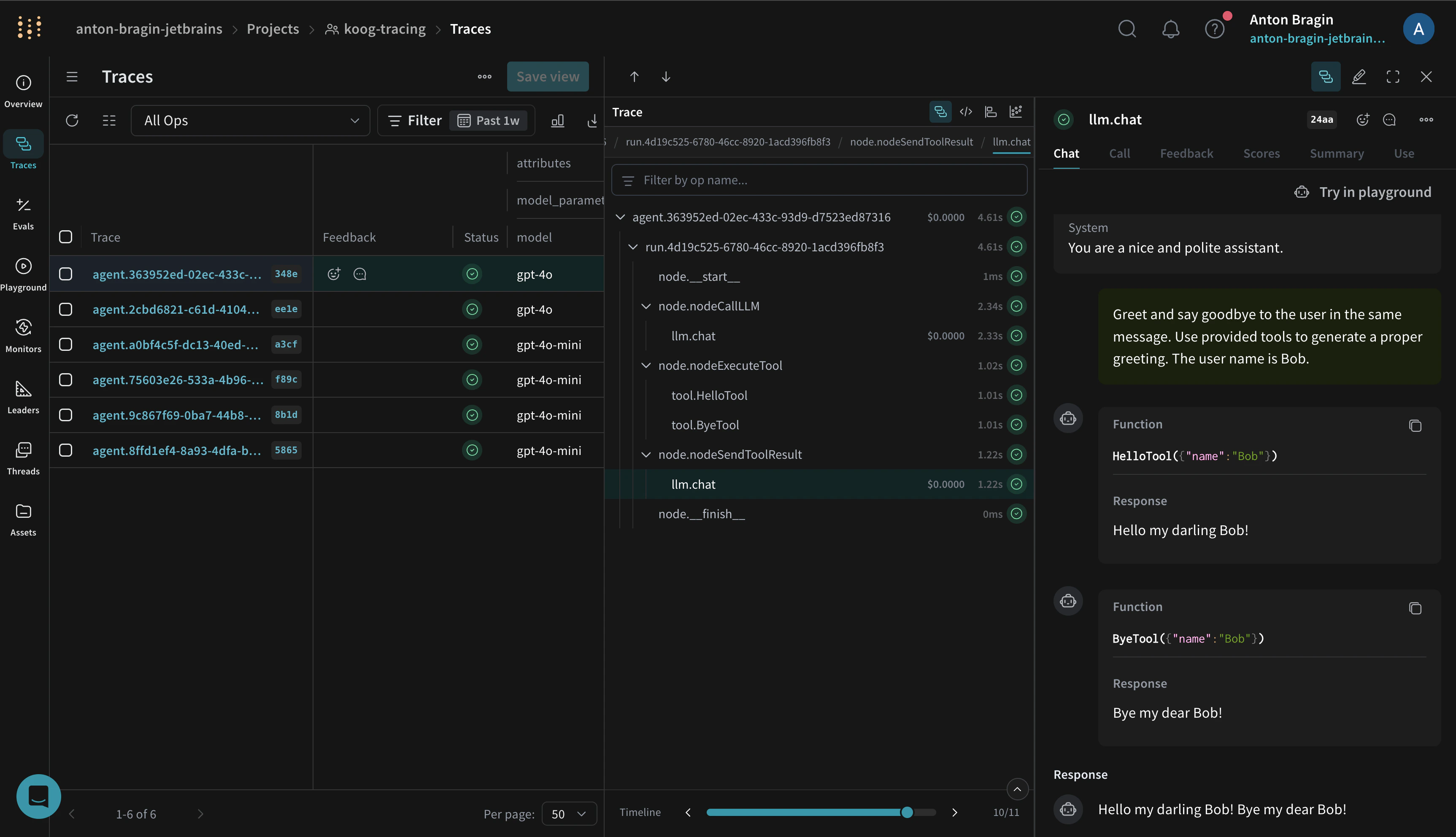
활성화하면 Koog의 Weave 익스포터는 Koog의 일반 OTEL 인테그레이션과 동일한 스팬을 캡처하며, 여기에는 다음이 포함됩니다.
- 에이전트 수명 주기 이벤트(시작, 중지, 오류)
- LLM 상호작용(프롬프트, completion, 토큰 사용량, 지연 시간)
- 도구 및 API 호출(함수 호출 및 외부 요청)
- 시스템 컨텍스트(모델 이름, Koog 버전, 환경 메타데이터)
이러한 트레이스를 Weave UI에서 시각화해 성능과 품질을 파악할 수 있습니다. Weave로 트레이스를 캡처하는 방법에 대한 소개는 Weave의 Tracing Overview를 참조하세요.
트레이스를 Weave로 스트리밍하는 실행 가능한 노트북은 Koog 문서를 참조하세요.
- 트레이스가 보이지 않으면 먼저
WEAVE_API_KEY, WEAVE_ENTITY, WEAVE_PROJECT_NAME이 올바르게 설정되어 있는지 확인하세요.
- 사용 중인 환경에서
https://trace.wandb.ai에 연결할 수 있는지, 그리고 익스포터가 위에 나온 대로 설정되어 있는지 확인하세요.
- 추가 문제 해결 방법과 샘플링 지침은 Koog의 OpenTelemetry 지원을 참조하세요.